1 Purpose and Functions
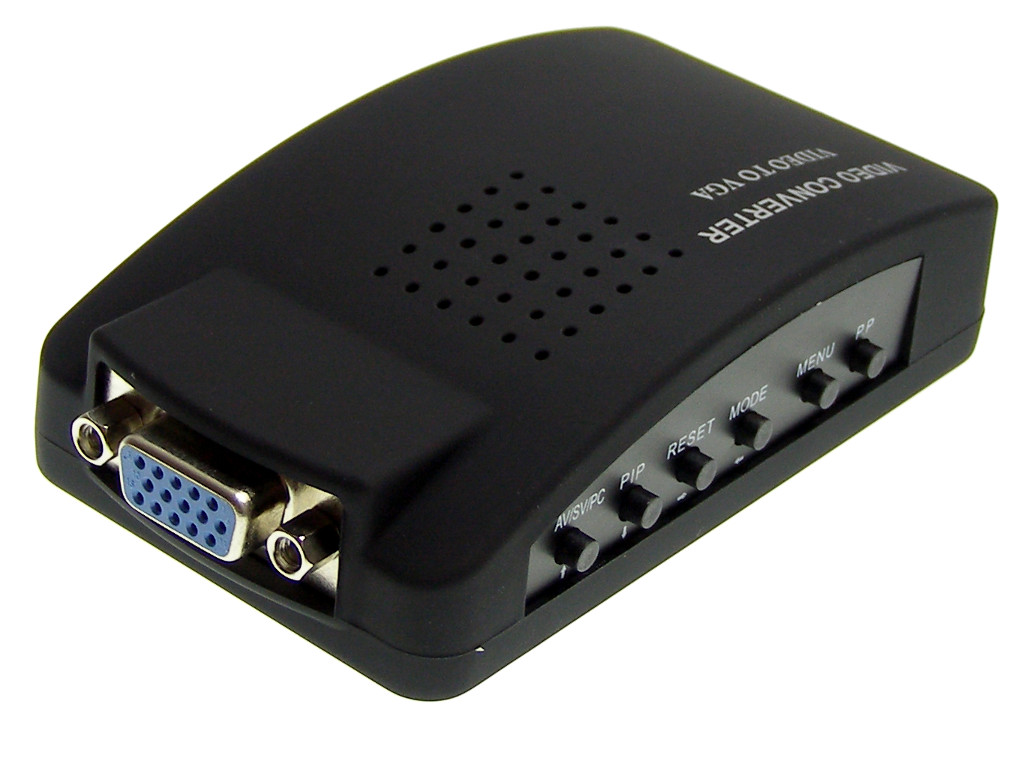
The advanced digital image converter ACTii AC5729 enables the conversion of video signals (Cinch/RCA, S-Video) to high-resolution VGA signals. The device is an ideal solution for integrating older video systems with modern LCD/LED computer monitors. The product is widely used in professional closed-circuit television (CCTV) systems, education (video equipment for teaching), and industry, allowing for the replacement of obsolete CRT monitors with standard computer displays.
Main features:
- ✔ Standard VGA output compatible with all types of monitors
- ✔ Support for a wide range of VGA resolutions from 800x600 to 1920x1200
- ✔ Automatic detection of PAL, NTSC, and SECAM systems
- ✔ Advanced OSD menu for precise image parameter adjustment
- ✔ Image freeze function for easier frame analysis
- ✔ Digital image filter ensuring excellent color reproduction
- ✔ 3D motion technology with adaptive de-interlacing
- ✔ 3D video processing offering sharp, bright, and saturated images without distortion
- ✔ Energy efficiency and low heat emission during long-term operation
- ✔ Lightweight, compact housing for easy installation anywhere
- ✔ Crystal clear image thanks to advanced integrated circuits
Practical application:
The converter allows connecting surveillance cameras, DVD players, game consoles, or other devices with an AV/S-Video output directly to a PC monitor. Thanks to the BYPASS function, it is also possible to simultaneously connect a computer and switch between image sources without having to reconnect cables.
2 Technical Specification
| Input signal | Video (Cinch / RCA), S-Video |
| Input systems | Auto-Detect PAL, NTSC, SECAM |
| Output signal | VGA (D-Sub) |
| Supported VGA resolutions | 800x600 @60/75Hz, 1024x768 @60Hz, 1280x1024 @60Hz, 1440x900 @60Hz, 1680x1050 @60Hz, 1920x1080 @60Hz, 1920x1200 @60Hz |
| VGA Input (Bypass) | Yes (pass-through for PC signal) |
| Power supply | 5V DC / 600mA |
| OSD Menu | Yes (on-screen) |
| Product dimensions | 120 x 70 x 24 mm |
| Product weight | 220 g |
| Certificates | CE, RoHS |
| Set contents | Converter, power/connection accessories |
3 Installation and Connection
"Plug & Play" device – no driver installation required. To start the system correctly, follow these steps:
- Connect the video signal source (e.g., CCTV camera or player) to the VIDEO (Cinch) or S-VIDEO socket.
- Connect the computer monitor to the VGA OUT output socket.
- (Optional) Connect the PC graphics card output to the VGA IN socket to use the pass-through function (Bypass).
- Connect the supplied 5V DC power adapter to the power socket on the converter.
- Turn on the monitor and signal source. Use the buttons on the converter housing to select the appropriate input source and set the resolution.
4 OSD Menu Configuration
The built-in On-Screen Display menu allows full customization of the displayed image. The following adjustment parameters are available:
- Brightness: Adjustment of the luminance level.
- Contrast: Difference between light and dark areas.
- Sharpness: Clarity of object edges.
- Saturation: Color intensity.
- Hue: Image color balance.
- HP (Horizontal Position): Shift the image left/right.
- VP (Vertical Position): Shift the image up/down.
- Resolution: Selection of VGA output operation mode.
5 Safety Instructions and Maintenance
Safety rules in accordance with EU standards:
- The device is intended for indoor use only.
- Use only a power adapter with parameters consistent with the specification (5V DC). Using higher voltage may permanently damage the electronics.
- Protect against moisture, flooding, and direct sunlight.
- Do not block ventilation openings to prevent the device from overheating during continuous operation.
- If damage to the housing or power cable is detected, immediately disconnect the device from the mains.
- Cleaning: Wipe with a dry, soft cloth. Do not use aggressive detergents or solvents.
The product meets CE and RoHS directive requirements, which guarantees safe use and absence of substances harmful to the environment.