1 Purpose and Functions
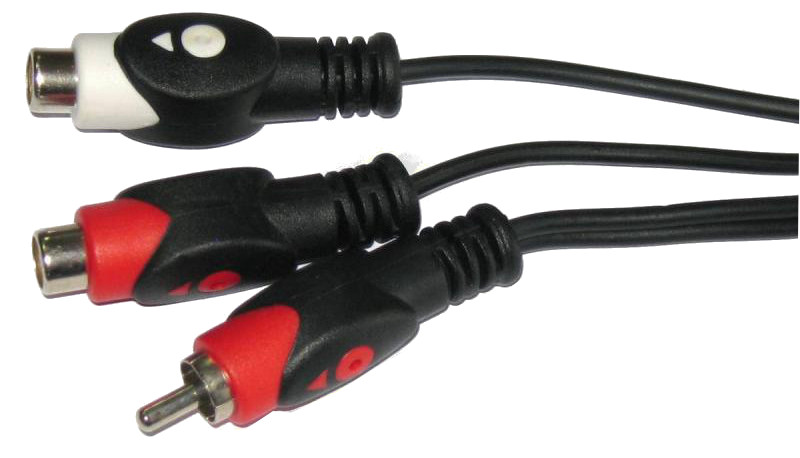
The ACTii AC4040 cable is a high-quality RCA Cinch signal cable designed to split an analog audio or video signal. The product features a splitter construction that ensures optimal signal distribution from one male plug to two female sockets. It is an ideal solution when there is a need to connect one signal source to two receivers or amplifiers.
Main features:
- ✔ Solid and precise workmanship ensuring connection durability
- ✔ Splitter design for easy cable management
- ✔ Copper conductor in high-quality PVC insulation
- ✔ Universal RCA Cinch standard compatible with most AV devices
- ✔ Optimal length of 5 meters allowing for flexible installation
Application:
The cable is used in home audio-video systems, home theater kits, sound systems, and professional CCTV monitoring installations for transmitting audio signals or composite video signals.
2 Technical Specification
| Model | ACTii AC4040 |
| Cable terminations | 1x CINCH plug (male); 2x CINCH socket (female) |
| Cable length | 5 m |
| Color | Black |
| Material | Copper, PVC insulation |
| Weight with packaging | 300 g |
| Package dimensions | 100 x 100 x 30 mm |
| Set contents | 1x RCA Cable |
3 Connection and Usage Instructions
Installation steps:
- Make sure the devices you intend to connect are turned off.
- Connect the single CINCH plug (male) to the appropriate signal output on the source device (e.g., player, mixer, recorder).
- Connect the cables leading to the receiving devices (e.g., amplifier, active speakers, monitor) to the two CINCH sockets (female).
- Ensure all connections are firmly seated to avoid noise and interference.
- Turn on the devices and check that the signal is transmitted correctly.
4 Safety and Maintenance
Safety rules:
- The product is intended for indoor use only. Do not expose it to moisture, rain, or extreme temperatures.
- Do not pull on the cable itself when disconnecting – always grasp the plug or socket housing.
- Avoid bending or twisting the cable sharply, which can lead to breakage of internal copper conductors.
- Keep out of reach of children. Small parts and the long cable can pose a hazard.
- If you find damage to the insulation or plugs, immediately discontinue use of the product.
Maintenance:
Clean with a dry, soft cloth. Do not use strong detergents or solvents that could damage the PVC insulation.
5 Troubleshooting
| Problem | Possible cause and solution |
|---|---|
| No signal | Check if the plugs are fully inserted. Ensure the source device is turned on and sending a signal. |
| Noise or crackling | Connectors may be dirty or oxidized. Clean them with a dry cloth. Check that the cable does not run too close to strong electromagnetic interference sources (e.g., high-power power supplies). |
| Signal only in one channel | Check the correctness of the connection of both output sockets. Test the cable with another device to rule out a failure of the receiver socket. |