1 Purpose and Functions
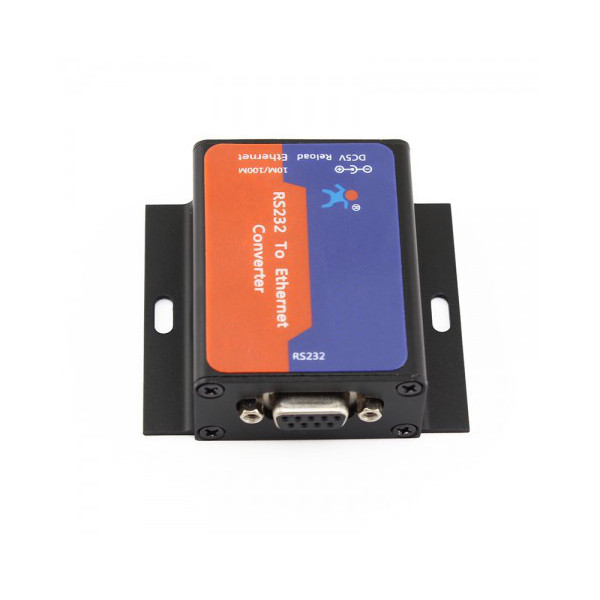
The ACTii AC4846 converter is an advanced networking device designed for bidirectional, transparent data transmission between an RS-232 serial port and an Ethernet network (TCP/IP). The device allows you to integrate any equipment equipped with an RS-232 interface (such as cash registers, scales, PLC controllers, or printers) into a local LAN network or the Internet. Thanks to an integrated TCP/IP protocol stack, users can manage serial devices from a computer located anywhere on the network using a virtual serial port (USR-VCOM software).
Key features:
- ✔ Supports DHCP, automatically obtains IP address, and supports query IP via serial setting protocol
- ✔ Supports DNS (Domain Name System) function
- ✔ Configuration parameters setting via built-in web page
- ✔ Firmware upgrade capability via network
- ✔ Auto-MDI/MDIX, RJ45 port with 10/100Mbps speed support
- ✔ Wide range of serial port baud rates: from 600 bps to 230.4 Kbps
- ✔ Parity bit support: None, Odd, Even, Mark, and Space
- ✔ Multiple operating modes: TCP Server, TCP Client, UDP Client, UDP Server, HTTPD Client
- ✔ Compatibility with USR-VCOM virtual serial port software
- ✔ Heartbeat packet mechanism to ensure connection stability and monitoring
- ✔ User-defined registration packet mechanism for link status verification
- ✔ Multiple connections support: in TCP Server mode, it can handle from 1 to 16 clients simultaneously
- ✔ Globally unique MAC address (user-defined MAC address option)
- ✔ Factory reset function
- ✔ Operation in local networks (LAN) and over the Internet (external network) via gateways and routers
- ✔ Compatibility with PC socket programs (VB, C++, Delphi, Android, iOS)
- ✔ Ability to share a single device (e.g., fiscal printer) among multiple computers
- ✔ Ability to connect multiple converters to one control computer
Application areas:
The device is used in industrial automation, POS systems, security monitoring, smart homes, and banking systems. It is ideal for remote meter data reading, LED panel control, card reader support in access control systems, and monitoring environmental parameters in server rooms.
2 Technical Specification
| Serial Interface | RS-232 (DB9 connector) and RS-485 (EIA/TIA compliant) |
| RS232 Baud Rate | 600 bps to 230.4 Kbps |
| Data Parameters | Data bits: 5, 6, 7, 8; Stop bits: 1, 2; Parity: None, Even, Odd, Space, Mark |
| Ethernet Interface | RJ45, 10/100 Mbps, Auto-MDI/MDIX |
| Network Protocols | IP, TCP, UDP, DHCP, DNS, HTTP, ARP, ICMP |
| Interface Protection | 2KV electromagnetic isolation |
| Data Buffering | Send: 6K bytes, Receive: 4K bytes (Ethernet); RS232 Receive: 800 bytes |
| Input Voltage | DC 4.75V to 7V |
| Power Consumption | 150mA at 5V; Power: 1W |
| Operating Temperature | -25°C to +75°C (Storage: -40°C to +105°C) |
| Operating Humidity | 5% to 95% RH (non-condensing) |
| Product Dimensions | 48 x 64 x 25 mm |
| Weight | Product: 217g; With packaging: 269g |
| Compliance and Certificates | CE, RoHS |
3 Safety Instructions
NOTE: Strictly follow the safety rules below to ensure proper device operation and avoid electrical hazards.
- Power Supply: The device requires a stable DC voltage in the range of 4.75V - 7V. Using a higher voltage power supply may permanently damage the electronics.
- Operating Environment: The converter is intended for indoor use only. Protect from direct contact with water, moisture, and extreme temperatures exceeding the specification range.
- Connection: All cable connections (RS-232, Ethernet, Power) should be made with the power source disconnected to avoid surges.
- Maintenance: Do not open the device casing. There are no user-serviceable parts inside. Cleaning should be done exclusively with a dry cloth.
- EU Compliance: The device meets CE and RoHS standards. Dispose of used equipment according to local electronic waste regulations (WEEE).
4 Installation and Configuration
Quick Start:
- Connect your serial device (e.g., fiscal printer) to the converter's DB9 port.
- Connect the RJ45 network cable to the converter's Ethernet port and your router or network switch.
- Connect the included power adapter to the converter's DC socket.
- Install the USR-VCOM software on your computer (available for Windows 2000/XP/Vista/7/8/10). This program will create a virtual COM port that maps to the converter's IP address.
- Open your web browser and enter the device's IP address (obtained via DHCP or pre-set) to access the configuration panel.
Device Operating Modes:
TCP Server Mode
The converter waits for a connection from a computer. It supports up to 16 simultaneous client connections.
TCP Client Mode
The converter automatically initiates a connection to a specific server IP address after power-up.
UDP Mode
High-speed data transmission without establishing a permanent connection, ideal for monitoring systems.
HTTPD Client Mode
Allows transmission of serial data directly to a web server using HTTP protocol (GET/POST).
5 Kit Contents
- ✔ ACTii AC4846 RS-232 to Ethernet Converter
- ✔ Dedicated Power Adapter
- ✔ User Manual
- ✔ Original Cardboard Packaging