1 Purpose and Functions
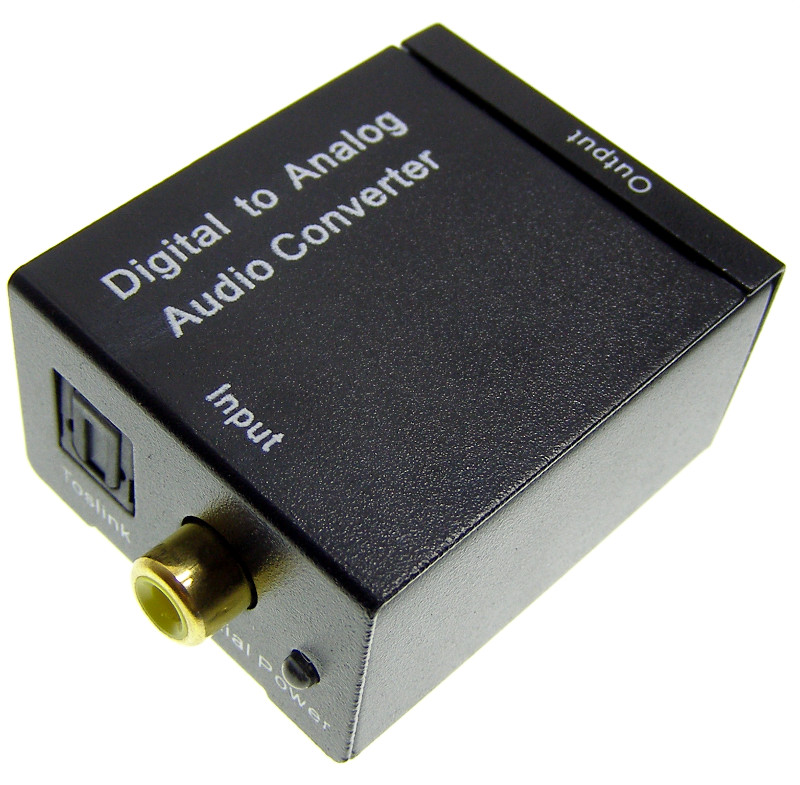
The ACTii AC5692 digital-to-analog audio converter is a high-quality device designed for use in home systems and professional audio-video installations. The device enables the conversion of a digital audio signal transmitted via a coaxial or optical (Toslink) cable into an analog stereo (L/R) signal. This makes it possible to connect modern digital devices, such as LED/LCD TVs, game consoles, Blu-ray players, or set-top boxes, to classic amplifiers, stereo receivers, or active speakers equipped with RCA (Cinch) connectors.
Main features:
- ✔ Converts digital audio signal from a coaxial or Toslink cable to an analog L/R signal
- ✔ Supports sampling rates of 32, 44.1, 48, and 96 KHz
- ✔ 24-bit S/PDIF input stream for left and right channels
- ✔ Ensures signal transmission without electromagnetic interference
- ✔ Simple Plug & Play installation and operation
- ✔ Compact dimensions for discreet mounting
Important information about signal format:
The device supports uncompressed digital audio in LPCM (Linear Pulse Code Modulation) format. Before connecting, ensure that the source device (e.g., TV) has its audio output format set to PCM or LPCM. The converter does not support multi-channel signals such as Dolby Digital or DTS.
2 Technical Specification
| Model | ACTii AC5692 |
| Audio Input | LPCM (Digital) |
| Audio Output | Stereo R/L (Analog) |
| Input connectors | 1 x Toslink (Optical), 1 x RCA (Coaxial) |
| Output connectors | 2 x RCA (Cinch L/R) |
| Sampling rates | 32, 44.1, 48, and 96 KHz |
| Bit depth | 24-bit S/PDIF |
| Operating temperature | -20°C to +80°C |
| Operating humidity | 5% to 95% RH (non-condensing) |
| Power supply | 5V DC 1A |
| Power jack | DC 2.1/5.5 mm |
| Product weight | 50 g |
| Packaging dimensions | 100 x 100 x 50 mm |
| Certificates | CE, RoHS |
3 Connection and Operation Manual
Installation of the device is simple and does not require specialized software. Follow the steps below:
- Power off devices: Before connecting, ensure all devices (audio source and receiver/amplifier) are powered off.
- Connect input: Connect the optical (Toslink) or coaxial (Coaxial) cable to the appropriate input port on the converter and to the audio output of your source device.
- Connect output: Connect the analog 2x RCA (Cinch) cable to the output ports of the converter (white and red) and to the line input on your amplifier or speakers.
- Power supply: Plug the power adapter connector into the DC jack on the converter, then plug the power adapter into a 230V mains socket.
- Start up: Turn on your devices. Set the input on your amplifier to the appropriate channel (e.g., AUX, CD, LINE IN).
- Source configuration: In the audio settings menu of the source device (e.g., TV), set the digital audio output format to PCM or LPCM.
4 Safety and Maintenance
Safety rules:
- The device is intended for indoor use only.
- Protect from moisture, water, and other liquids.
- Do not use the device near heat sources (radiators, stoves).
- Use only the included 5V 1A power adapter. Using a higher voltage adapter may permanently damage the device.
- Do not open the casing – risk of electric shock and loss of warranty.
Maintenance:
The device does not require specialized maintenance. Clean the casing with a dry, soft cloth. Do not use detergents or solvents. Unplug the power adapter from the electrical outlet before cleaning.
5 Troubleshooting
No sound:
- Check if the power adapter is properly connected and if the power indicator (if present) is lit.
- Ensure audio cables are securely connected in the sockets.
- Crucial: Check if the TV/source settings are set to PCM/LPCM output format. The converter does not decode Dolby Digital (AC3) signals.
Audible noise or interference:
- Ensure RCA cables are of good quality and have adequate shielding.
- Check that audio cables are not running directly next to high-voltage power cables.
6 Kit Contents
- 1 x Digital-to-Analog Audio Converter DAC (ACTii AC5692)
- 1 x 5V 1A power adapter
- 1 x User manual