1 Purpose and Functions
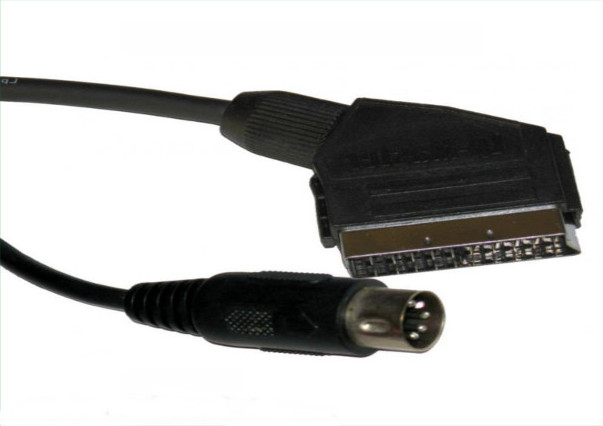
The ACTii AC5583 cable is a high-quality audio-video signal cable designed for a stable connection of multimedia devices. The cable is equipped with EURO (SCART) and DIN connectors, making it an ideal solution for connecting older RTV equipment, audio systems, and retro-computers to modern or compatible receivers. Thanks to the use of PVC insulation, the cable is characterized by high resistance to mechanical damage and external interference.
Main features:
- ✔ Solid construction guaranteeing product longevity
- ✔ Audio-video signal cable in durable PVC insulation
- ✔ Universal EURO and DIN connectors
- ✔ Optimal 1.2m length for easy cable management
- ✔ Aesthetic black color matching any audio-video set
2 Technical Specification
| Model | ACTii AC5583 |
| EAN | 6931240055830 |
| SKU | 558362478 |
| Connector types | EURO / DIN |
| Cable length | 1.2 m |
| Color | Black |
| Insulation material | PVC |
| Product weight | 11 g |
| Weight with packaging | 50 g |
| Package dimensions | 100 x 100 x 40 mm |
3 Safety Instructions
To ensure safe and trouble-free use of the product, please follow these safety rules in accordance with EU standards:
- Operating environment: The cable is intended for indoor use only. Protect it from moisture, direct water exposure, and extreme temperatures.
- Mechanical damage: Do not use the cable if there is visible damage to the outer insulation or plugs. This may cause short circuits or damage to connected devices.
- Connection: It is recommended to turn off the power on both connected devices before connecting or disconnecting the cable to avoid power surges.
- Storage: The cable should not be excessively bent or twisted at sharp angles, which could lead to breaking the internal signal wires.
- Children: This product is not a toy. Keep it out of reach of small children due to the risk of choking or entanglement.
4 Installation and Usage
Connection method:
- Ensure both devices (transmitting and receiving) are switched off.
- Identify the appropriate sockets on your devices: EURO (SCART) socket and DIN socket.
- Insert the DIN plug into the appropriate socket on the device, paying attention to the pin layout (do not use excessive force).
- Insert the EURO plug into the SCART socket on the receiver (e.g., TV), ensuring the plug is firmly seated.
- Switch on the devices and select the appropriate signal source (AV / SCART) in the receiver's menu.
Maintenance:
The cable does not require specialized maintenance. If necessary, it can be wiped with a dry, soft cloth. Do not use strong detergents or solvents that could damage the PVC insulation.
5 Troubleshooting
| Problem | Possible cause and solution |
|---|---|
| No picture or sound | Check if the plugs are pushed in all the way. Ensure the correct signal input is selected on the receiver. |
| Noise or interference | Ensure the cable does not run in the immediate vicinity of strong electromagnetic field sources (e.g., high-power power supplies). |
| Black and white picture | Check the signal standard settings (PAL/NTSC) on the transmitting and receiving devices. |